


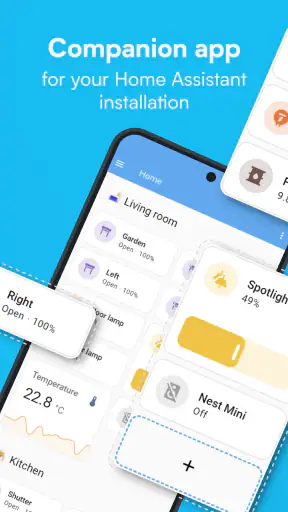
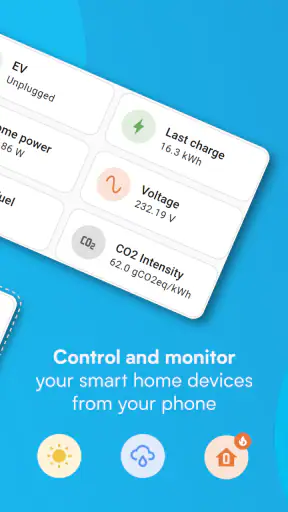
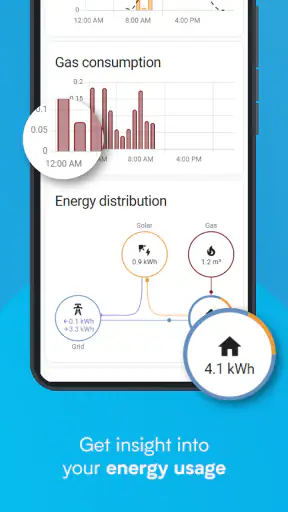

I like smart-home apps most when they make the house feel simpler rather than turning every room into another technical project. Home Assistant sits on the more ambitious side of that idea. It is a free House & Home app from Open Home Foundation (OHF), designed to give you one place to interact with a connected home from an Android or iOS device. I found its strongest appeal in the way it can bring different parts of a home-control setup into one mobile experience instead of making me jump between separate manufacturer apps.
That central capability sounds straightforward, but it changes how a connected home feels day to day. Instead of thinking about which brand controls a light, sensor, thermostat, or other device, I can think in terms of rooms, routines, and situations. The app is listed for Everyone, has passed the one-million-install mark, and holds an average rating of 4.1 from roughly thirteen thousand ratings. Those figures suggest a well-established app, but they do not remove the need to understand what kind of user it suits.
One control point for a mixed smart home
The most important thing to understand is that Home Assistant is not simply a remote control for one product family. Its value comes from acting as the mobile face of a broader home-automation setup. When the underlying system is configured properly, the app lets me check what is happening at home and interact with it while I am away. That is much more useful than having a collection of isolated controls that each work only inside their own brand’s ecosystem.
In practical terms, this makes the app especially interesting for homes where devices have accumulated over time. A person may start with a smart bulb, add a door sensor later, then bring in a camera, heating control, or voice assistant from another company. The usual alternative is to keep several apps installed and remember which one handles each task. Home Assistant offers a more unified approach, although reaching that point requires more preparation than using a simple brand-specific app.
I would describe the app as the control surface for people who want to see their home as one connected environment. That distinction matters. If you only want to turn a single brand of lamp on and off, the manufacturer’s app may be faster to understand. If you want a broader view of the home and a consistent way to interact with it, this app becomes more compelling.
The mobile experience is also useful because a home is not always managed from a desktop or a wall-mounted tablet. I can check the state of the house from my phone, make a change while travelling, or use the app as a quick confirmation that something happened. The benefit is not just remote access as a headline feature; it is the reduction of small decisions throughout the day.
What remote control changes in everyday life
Remote control has a different value depending on the task. Turning on a light from another room is convenient, but checking the home before leaving work can be more meaningful. I might want to see whether a door sensor still reports the expected state, adjust a device before arriving, or check a room without opening several separate applications. The app’s usefulness comes from gathering those actions into a familiar place.
There is also a psychological benefit to having one overview. When a home contains several connected devices, uncertainty is often more annoying than the action itself. Did I leave something running? Is the room already comfortable? Is the entry point in the state I expect? A unified mobile view can answer those questions more quickly than a set of unrelated apps.
That does not mean every action becomes instant. The app depends on the wider Home Assistant setup, the devices connected to it, and the network path between the phone and the home. When one of those pieces is poorly configured, the mobile app can feel like the problem even when the real issue is elsewhere. I learned to treat it as one part of a system rather than a magic replacement for setup work.
How the app feels when used regularly
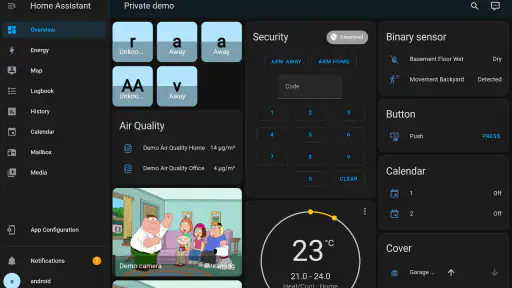
For occasional use, the app is best approached as a dashboard and remote control. I open it when I need a quick status check or a direct action. For regular use, its value grows when the layout reflects how I actually think about the home. A room-based arrangement is easier to scan than a long list of device names, particularly when several products perform similar jobs.
This is one of the first practical tips I would give a new user: organize the view around decisions, not around the order in which devices were added. “Leaving home,” “arriving home,” or “bedtime” are more useful mental categories than a random list of bulbs and sensors. Even if the underlying setup contains many individual devices, the phone should present the few things I need to understand at a glance.
A second useful habit is to avoid exposing every possible control on the main screen. It is tempting to place everything in front of you, but a crowded dashboard makes urgent information harder to spot. I prefer a compact view for common actions and a deeper section for less frequent adjustments. That makes the app feel more like a calm control panel and less like a technical inventory.
Because the app is free, the main investment is not a subscription decision but time and attention. That is good news for curious users who want to explore, but it also means the app does not hide the complexity of home automation behind a completely guided experience. I would not install it expecting a plug-and-play setup identical to a single-brand smart-home application.
A realistic evening scenario
Imagine I am leaving work later than planned while family members are already at home. Instead of opening one app for lighting and another for a different device, I use the Home Assistant app to check the home’s current state and make the small adjustment that matters. Perhaps a room needs attention, or I want to prepare the house before arriving. The value is not that the action is dramatic; it is that I can make it without reconstructing the home’s device map in my head.
Later, when I am ready for bed, the same central control idea becomes more useful. I can review the relevant parts of the home from one place rather than walking through each room or checking individual brand apps. For me, this is where the app earns its place: not through constant interaction, but by reducing friction at moments when I want confidence quickly.
There is an important trade-off in that scenario. The app can make the final interaction easier, but it cannot guarantee that every connected device behaves identically. Different products may expose different controls, update at different speeds, or depend on their own hardware and network conditions. I would therefore use it as a practical command center while keeping realistic expectations about the devices behind it.
The setup learning curve is part of the experience
Home Assistant is a better match for someone willing to understand how the home is assembled. The app itself may be straightforward once the environment is ready, but the wider system can involve naming devices, arranging rooms, deciding which states matter, and choosing how much automation to expose. New users should expect a period of adjustment instead of judging the app after only a few minutes.
My advice is to begin with one reliable workflow. Choose a small daily task, make it easy to find in the mobile interface, and use that as the test case. This reveals whether the organization makes sense before the setup becomes crowded. Adding everything at once may create an impressive screen, but it makes it harder to tell which parts genuinely improve life.
Another non-obvious point is that a unified app can expose inconsistencies that separate apps conceal. When every device lives in its own application, naming and status differences are easy to ignore. Once everything appears together, unclear labels and duplicate controls become obvious. That may feel like extra work at first, but it also gives me a clearer picture of what the home is actually doing.
Where it beats the usual alternatives
The usual alternative is to remain inside one manufacturer’s ecosystem. That route is often easier at the beginning: the app knows its own devices, the terminology is consistent, and the setup tends to be more guided. For a small home with products from one brand, I would seriously consider staying there. There is no reason to add a broader control layer if it does not solve a real problem.
Home Assistant becomes more attractive when the home is mixed or when I want a single view beyond the limits of one brand. Its advantage is not necessarily that every individual control is better. The advantage is the wider perspective and the possibility of treating the home as a connected whole. That is a meaningful difference for people who have outgrown isolated device apps.
The comparison is less favorable for someone who dislikes configuration. A simple manufacturer app may offer fewer possibilities but also fewer decisions. Home Assistant asks me to think about structure, naming, and workflow. I see that as a strength when I want control, but as a burden when I only want a light to respond to a button press.
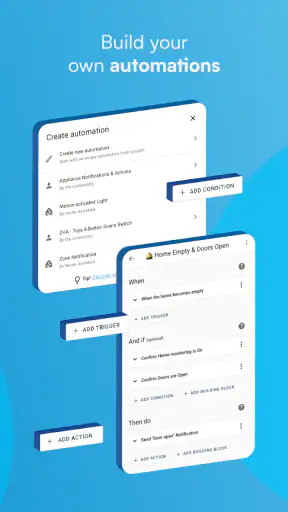
It is also worth separating remote access from automation expectations. The store summary emphasizes controlling the home from anywhere, and that is the capability I found easiest to appreciate. More elaborate behavior depends on how the surrounding Home Assistant environment is built. The mobile app should not be judged as though installing it alone automatically creates a sophisticated smart home.
Limitations that become visible over time
The biggest limitation is complexity. Even an experienced phone user can feel unsure when a home contains many devices, states, and possible actions. The challenge is not merely learning where buttons are; it is deciding what deserves attention. A badly organized setup can make a powerful app feel slower than several simpler ones.
A second limitation is dependency. If a device is offline, named confusingly, or represented in an unexpected way, the mobile experience inherits that problem. This is not a reason to avoid the app, but it is a reason to troubleshoot methodically. I would check the device itself, the wider Home Assistant setup, and the network before assuming the phone app is at fault.
There is also a trade-off between visibility and distraction. A detailed home overview can be reassuring, but constantly checking every state can turn convenience into maintenance. I get better results when I decide which information is actionable. A sensor status that never changes my behavior does not need to dominate the first screen.
Privacy-minded users may appreciate having a more unified approach to their home, but they should still think carefully about the architecture they choose and the access they enable. I would not treat any remote-control app casually when it can affect the physical environment. Use a strong device lock, keep the phone protected, and avoid exposing controls that do not need to be used remotely.
Who will gain the most from it
I think Home Assistant is best for people who already have, or genuinely want, a connected home with more than one kind of device. It is particularly appealing to users who enjoy refining their setup, want a room-oriented overview, and are willing to spend time making the interface fit their routines. The free price removes one barrier to trying it, while the Everyone age rating makes it broadly approachable from a store perspective.
It is also a good choice for someone who is tired of remembering several control apps. The payoff is strongest when the home has enough variety that a single manufacturer’s application no longer feels sufficient. In that situation, the app’s central capability can save small amounts of effort repeatedly, which is more valuable than a one-time novelty.
I would steer complete beginners toward a modest first project rather than a whole-home conversion. Start with a few devices and one clear use case. Learn how the app presents status and actions, then expand only when the next addition solves a visible problem. That approach keeps the learning curve manageable and makes it easier to notice whether the system is genuinely helping.
On the other hand, I would skip it if I only wanted a single brand’s basic controls, disliked configuring technology, or expected the mobile installation by itself to deliver a finished smart-home experience. A simpler dedicated app may be less flexible but more comfortable in those situations. Home Assistant rewards involvement; it is not the best fit for someone who wants to think about the system as little as possible.
My final view after using the central-control approach
Home Assistant’s strongest idea is simple: give me one mobile place to understand and control a connected home, even when that home is more complicated than one brand’s product line. In my experience, that can make remote checks, room-based actions, and everyday routines feel much more coherent. The app does not eliminate the work of building a good setup, but it gives that work a practical destination.
The rating of 4.1 and the broad install base make it clear that many people are willing to engage with this approach, while the free download makes experimentation easier. Still, I would choose it for the control and flexibility rather than because it promises effortless automation. Its real strength appears after I organize the home around useful decisions and stop treating the dashboard as a list of every available device.
My recommendation is therefore specific: try it if your home is becoming a mix of connected products and you want a single, more thoughtful way to manage them from your phone. Begin small, keep the main view focused, and judge it by whether it removes friction from a real routine. If that routine matters to you, Home Assistant can become the most useful app in your smart-home setup. If you only need one uncomplicated remote, the broader system may be more effort than the result is worth.


